

Step 4: Paste Your API Token Here
We set up the Google Ads MCP server to see what the official path looks like from the inside. It ends with a developer token in cleartext.
Not for a customer engagement. We spend a lot of time reading other people's MCP configurations, and we wanted to walk the happy path ourselves rather than only ever seeing where it lands.
Here is where the official instructions land you. This is from Google's own repository:
{
  "mcpServers": {
    "google-ads-mcp": {
      "command": "pipx",
      "args": ["run", "--spec", "git+https://github.com/googleads/google-ads-mcp.git", "google-ads-mcp"],
      "env": {
        "GOOGLE_APPLICATION_CREDENTIALS": "PATH_TO_CREDENTIALS_JSON",
        "GOOGLE_PROJECT_ID": "YOUR_PROJECT_ID",
        "GOOGLE_ADS_DEVELOPER_TOKEN": "YOUR_DEVELOPER_TOKEN"
      }
    }
  }
}
Replace the placeholder, save the file, restart the client. Done. You now have a Google Ads API developer token sitting in cleartext in a JSON file in your home directory.
Nobody did anything wrong. That is the entire point of this post.
This is not one vendor being careless
We went looking at other implementations of the same server to see whether Google was an outlier. It is not. Community builds of the Google Ads MCP ask for more, not less: the developer token plus an OAuth client ID, client secret, and refresh token, all in the same env block or an adjacent .env file. One implementation warns in its own README that the refresh token is printed to stdout by design, so don't redirect the server's output to a shared log.
The pattern generalizes because it is structural. The MCP client config format has an env block, the env block takes string values, and a string value is a plaintext credential. There is no secret type in the schema. There is no reference indirection in the spec. If you are writing setup instructions for an MCP server and you need the user to supply an API key, the documented place to put it is that block, and so that is what every quickstart on the internet says to do.
Which means the credential hygiene of your entire agent surface is currently being set by a hundred different README authors who are each optimizing for time-to-first-successful-call.
What is actually in that file
Take the Google Ads case specifically, because the credential properties matter more than the fact of exposure.
A Google Ads developer token is granted per manager account and gates API access across every account under it. Test tokens are issued instantly; production tokens go through a manual review by Google that takes days to weeks. That review cost is exactly why nobody rotates one casually.
Next to it sits an OAuth client secret and a refresh token. The refresh token is valid until somebody explicitly revokes it. There is no natural expiry doing you a favor here.
So the file contains a long-lived, manually-provisioned, broadly-scoped credential set, stored in cleartext, on a laptop, in a well-known path. And because the whole point is that an agent can start the server unattended, it has to be readable without a human present. That constraint is real. You cannot solve this by prompting for a passphrase.
The standard mitigation is not a mitigation
The most common security note in MCP server documentation reads roughly: never commit your config file to git, add it to .gitignore.
That is good advice and it addresses one path out of maybe eight. It does nothing about the credential being in a directory that gets picked up by a backup agent, synced to a cloud drive, included in a support bundle, visible on a screen share, readable by any process running as that user, or readable by the agent itself. The last one deserves a beat: an autonomous coding agent with shell access and a config file full of tokens in its own working directory is a combination worth thinking about for longer than it usually gets.
.gitignore hides the file from one specific destination. The secret is still a secret sitting in a file.
Why we keep running into this
We patch MCP client config files as part of deploying our agent. That is how our proxy gets in front of the servers a coding agent talks to: we rewrite the config so the client launches through us. It is a routine, mechanical part of installation.
It also means we read a lot of these files across a lot of machines, and the env blocks are right there. Every deployment, on every laptop, in every organization. GitHub PATs. Cloud provider keys. Database connection strings with the password inline. Now Google Ads developer tokens.
We did not go looking for this. Patching the config is mechanical, and the env blocks are simply there when you open the file.
We saw it often enough that we now check for it directly. Config files like .claude.json get scanned for credentials sitting in cleartext, so a plaintext token surfaces as a finding rather than as something an engineer happens to notice mid-deployment. The credential is in a known file, in a known object, in a known format, put there by instructions the vendor wrote.
The fix: keep the reference in the file, keep the secret in the vault
The config holds a pointer. The vault holds the secret. op run resolves one into the other at launch, in memory, for the life of the process.
This runs on 1Password, and specifically on the 1Password CLI (op). Install it, then turn on the desktop app integration under Settings > Developer:
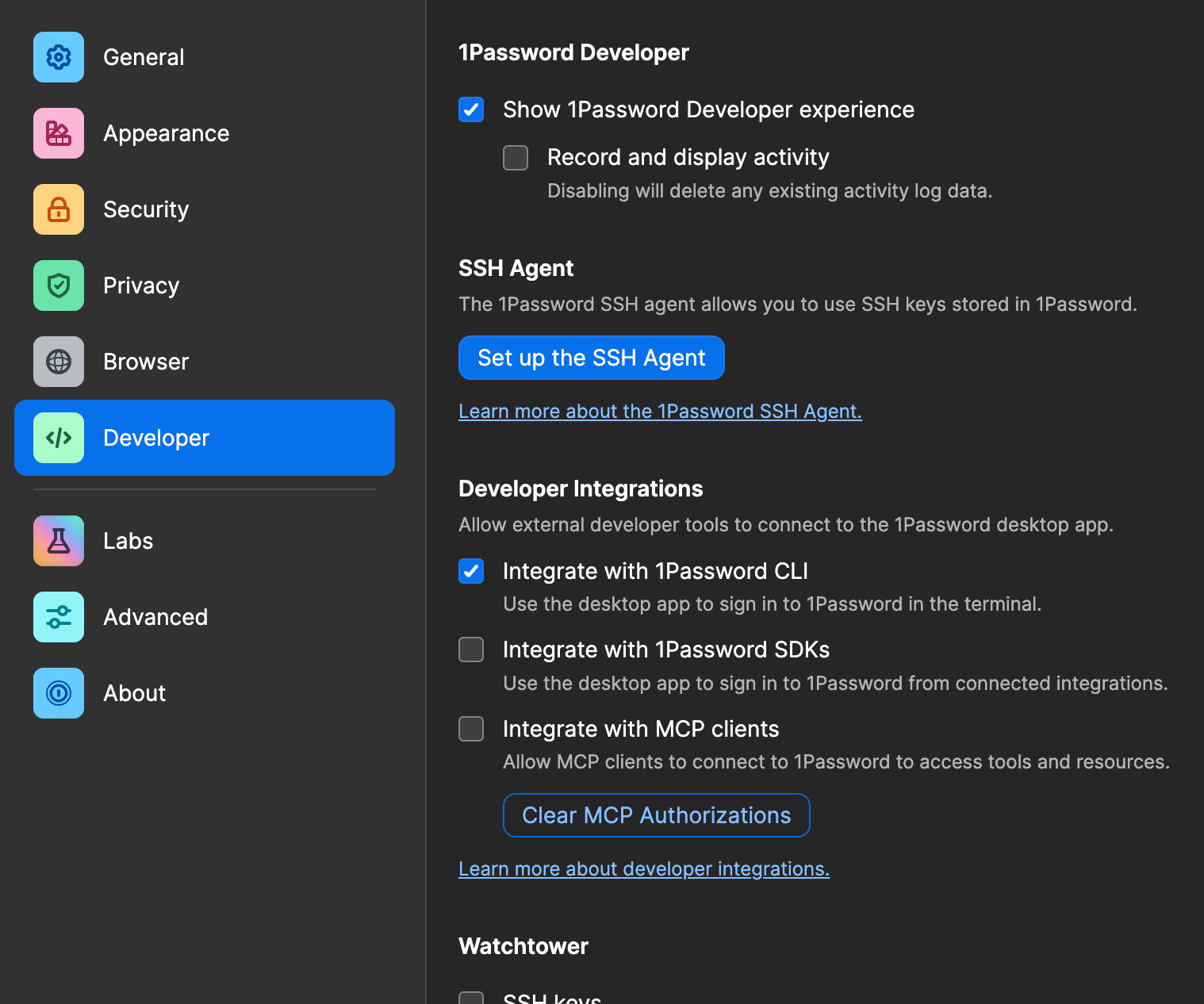
Integrate with 1Password CLI is the one you need.
1. Put each credential in a vault item and note its reference, in the form op://vault/item/field.
2. Pick where op run sits. Two patterns work. The difference is which process gets wrapped, and it decides how much each server can read.
Option A: wrap each server
Each server spawns its own process, so make op that process:
{
  "mcpServers": {
    "google-ads-mcp": {
      "command": "op",
      "args": [
        "run", "--no-masking", "--",
        "pipx", "run", "--spec",
        "git+https://github.com/googleads/google-ads-mcp.git", "google-ads-mcp"
      ],
      "env": {
        "GOOGLE_PROJECT_ID": "op://Engineering/Google Ads API/project_id",
        "GOOGLE_ADS_DEVELOPER_TOKEN": "op://Engineering/Google Ads API/developer token"
      }
    }
  }
}
The client sets that env block on the op process, so op starts out holding pointers rather than secrets. It resolves every op:// value it finds and passes the real ones down to the server it launches. The variable names never change, which is why this is a drop-in edit: the server reads GOOGLE_ADS_DEVELOPER_TOKEN from its environment exactly as it did before, and cannot tell the difference.
--no-masking matters here. By default op run watches everything the server prints so it can black out any secret that shows up in the output. To watch, it has to sit in the middle of the conversation. That's harmless when the output is log lines. It's a problem for a stdio MCP server, because there the output isn't logs, it's the protocol. The client and server talk to each other over that exact channel, and putting a filter in the middle of it risks garbling messages or rewriting them in flight.
Option B: wrap the client
This is the pattern 1Password documents. Put the references in an env file:
# ~/.env.mcp

GOOGLE_ADS_DEVELOPER_TOKEN=op://Engineering/Google Ads API/developer token

GITHUB_TOKEN=op://Engineering/GitHub PAT/token
Launch the client through op run, and the resolved values land in its environment:
op run --no-masking --env-file ~/.env.mcp -- claudeNow ${VAR} in the config works, because the client actually holds the value by the time it expands it:
"env": {
  "GOOGLE_ADS_DEVELOPER_TOKEN": "${GOOGLE_ADS_DEVELOPER_TOKEN}"
}
Note that ${VAR} expansion is a client feature, not part of the MCP spec, so check yours supports it.
Which one
Option B is less typing: one env file, one launch command, one biometric prompt, every server covered. The cost is that every credential sits in the client's environment, so all of your servers, and every shell command the agent runs, inherit all of them.
Option A gives each server only the secret it needs, and works when there is no shell to wrap, such as a GUI launch. The cost is a prompt per server and more lines in the config.
If your threat model includes what an agent with shell access can read, that is Option A. If you want it working in five minutes, Option B is what 1Password recommends and it is a real improvement over plaintext either way.
3. Scope access to a dedicated vault using a service account, so a compromised agent process cannot enumerate everything you own.
That is the whole change. One line per secret, in the file you already have. Nothing plaintext is left in it.
The first time a server starts, you approve the access:
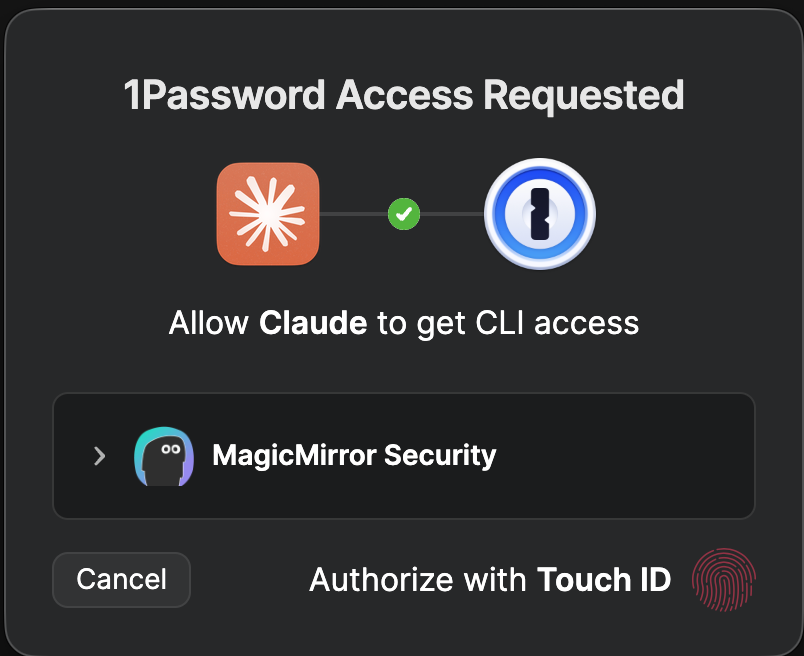
This is the desktop app's CLI integration authorizing the op process Claude Code just spawned, gated behind Touch ID, scoped to one named vault. The agent is not being given the vault. It starts a process, and 1Password hands that process one resolved value.
Two problems
Credentials at rest and access at runtime are different problems.
The first is solved above. The hard part is the inventory, not the edit, and it is the part most organizations have not started.
The second begins the moment the first is fixed, and it is where we work: our MCP proxy classifies every tool call before it executes, on-device, scans tool results for injected instructions, and checks config files for the plaintext credentials this post is about, because we kept finding them.
Vault your tokens first. It takes an afternoon, and the instructions that created the problem are not going to change on their own.



