
See it
Full visibility into your AI footprint.
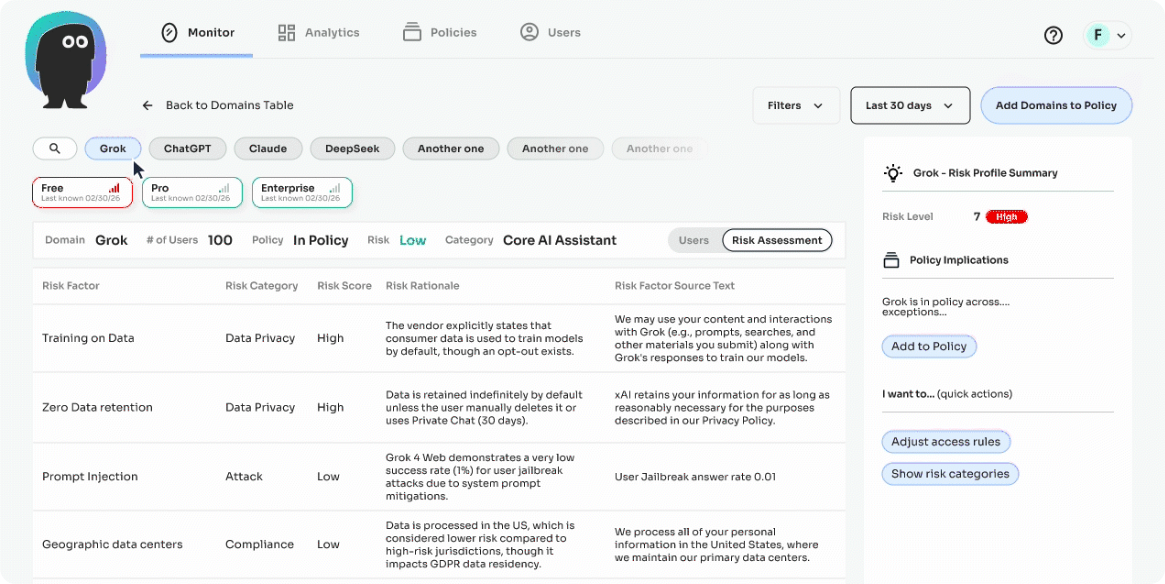
See which AI tools are being used across your business and assess risks in real time.
500+ AI tools covered 9 risk categories On-device classification
The problem
Your team is using more AI tools than you know about.
Most mid-market orgs have 30-50+ AI tools in use. Most security teams can name under 10. Existing tools can't see the gap.
70%
Access personal AI accounts outside corporate control
92%
of CISOs are concerned about AI agents in their environment
Darktrace 2026
$4.63M
average cost of a shadow-AI-related data breach
BM Cost of a Data Breach 2025

What you get
Four concrete outcomes, from the entry point of your AI governance program.
01
Visibility across 500+ AI tools
02
Risk-scored against nine industry categories
03
Detection of AI-native attacks
04
Continuous re-evaluation & audit-ready record

01
Visibility
Every AI tool your team touches: ChatGPT, Claude, Gemini, Copilot, Grok, NotebookLM, Figma AI, hundreds more. Including personal-account usage and browser-based tools your CASB can't see.

02
Risk-Scored
Each AI tool is evaluated on its own technical footprint against nine risk categories: audit log and trail, geographic data centers, intellectual property posture, prompt injection resistance, SOC 2 / ISO 27001 compliance, supply chain vulnerabilities, third-party AI risks, training on customer data, and zero data retention.

03
Attack Detection
Our Risk Monitoring Agent runs on the endpoint and watches for the attacks built for AI itself: prompt injection attempts, malicious skill files, manipulated tool calls, and other runtime threats your EDR can't reach.

04
Audit-ready
AI tools change their data practices. New tools launch every week. The Risk Monitoring Agent updates evaluations continuously, and every observation is timestamped, exportable, and audit-ready. When your board or a regulator asks, the answer exists.
How it works
Deploys in a day.
Complete picture in 48 hours.
STEP 01
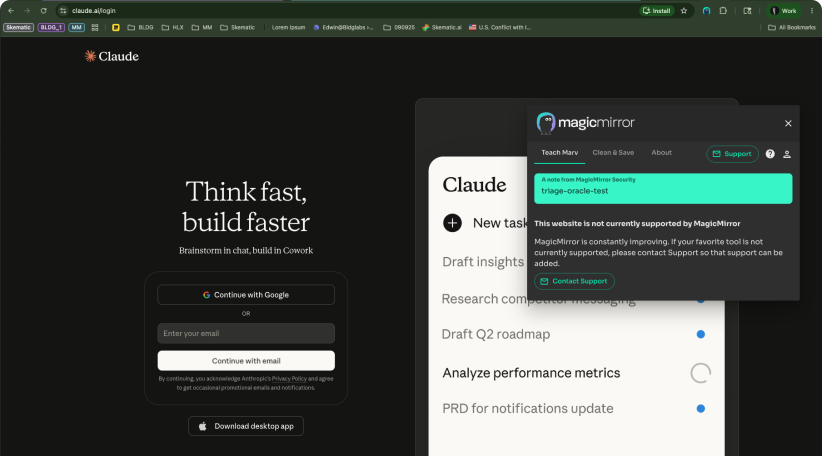
Deploy the browser extension via your MDM
Chrome, Edge, Safari. Jamf, Intune, Kandji. Zero prompts to end users. Your existing device management does the work.
STEP 02
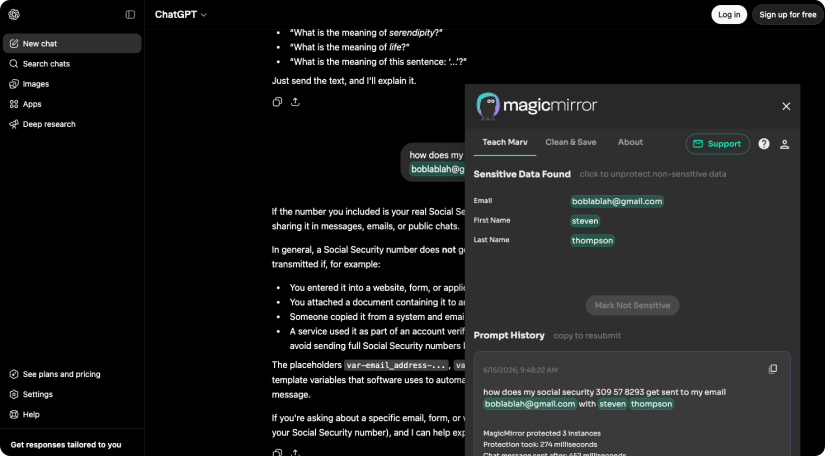
On-device observation begins immediately
The extension sees AI usage on the endpoint, after TLS decryption, where the activity actually happens. Data never leaves the device for inspection.
STEP 03
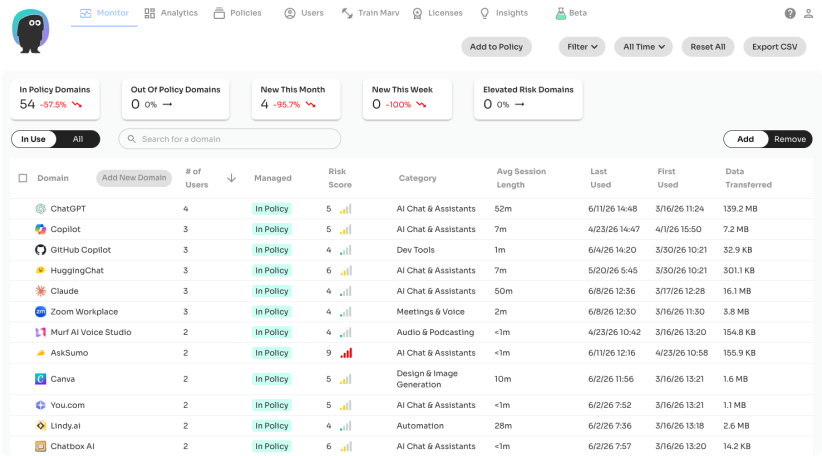
Dashboard populates in real time
Tool inventory, user counts, risk scores, data volumes. A complete picture of your AI landscape in 48 hours. Filterable by department, role, and browser.
Free Risk Assessment
Start with data, not assumptions.
Run a free 2-day risk assessment. You get a complete view of your AI risk and the data to guide your AI policy.
No commitment. No infrastructure to stand up. Your MDM deploys the extension, the dashboard populates in 48 hours, and you walk out with a complete view of where AI lives in your environment, what it touches, and what to address first.
Run 2-day risk assessment
What you walk out with
Full tool inventory across browsers and accounts
Risk-scored report covering all nine categories
Executive summary for the board
Remediation roadmap tailored to your environment
Your data stays yours, on the endpoint

Works with your stack
Risk Monitoring fits into the security stack you already run.
Deploys via your MDM, governs through your IdP, exports to your SIEM, evidences to your GRC. Not another silo.
Identity
Okta, Microsoft Entra ID, Google Workspace
Endpoint Management
Jamf, Microsoft Intune, Kandji distribution

Browsers
Chrome, Microsoft Edge, Safari, Firefox
AI Systems
500+ AI tools, Chat & assistants, Embedded AI, Local agents & MCP
MagicMirror AI Security Platform
AI Risk Monitoring
A strong AI program is safe and effective: visibility to see what's happening, controls to keep it secure, and measurement to prove it's working.

See it
AI Risk Monitoring
See every AI tool, account, and prompt used across your organization – both personal and enterprise logins. Real-time dashboards and proactive risk assessment by department, role, and risk level.


Control it
AI Policy Enforcement
Set rules for how AI gets used and accessed. Allow, guide, protect, or block and redirect, all on-device, in milliseconds.

Protect it
AI Data Protection (Marv)
Last-mile protection for PII, PCI, PHI, and IP. Marv detects and anonymizes sensitive data on-device, before it leaves. Specialized models for industry verticals like financial services, healthcare and legal.

Measure it
AI Insights
Measure AI productivity, proficiency, and adoption. The Insights Agent scores anonymized prompt sessions and surfaces patterns that drive ROI.
Trusted by
Trusted by security teams who don't have time to guess.

Customers & Partners






Frequently Asked
The questions CISOs actually ask.

What can MagicMirror see that our CASB can't?
Browser-based AI tools on personal accounts, AI usage on unmanaged or BYOD devices, and the content of prompts before
they leave the endpoint. CASBs see sanctioned cloud traffic. MagicMirror sees what employees actually type into AI.
they leave the endpoint. CASBs see sanctioned cloud traffic. MagicMirror sees what employees actually type into AI.
Does data leave our environment?
No. Classification and policy decisions happen on the endpoint. Prompts never leave the device for inspection. Metadata
flows to your tenant for dashboards; raw content does not.
flows to your tenant for dashboards; raw content does not.
How long does deployment take?
A day for MDM deployment. 48 hours to a complete picture of your AI usage. No additional infrastructure required.
Which browsers are supported?
Chrome, Edge, Safari, Brave, and Arc. All Chromium-based browsers and Safari are supported via standard extension APIs.
Do users see any prompts or slowdowns?
No. The extension runs silently for visibility-only deployments. End users don't get prompted, blocked, or slowed down.
Active policy enforcement (when you turn it on) is configurable per workspace.
Active policy enforcement (when you turn it on) is configurable per workspace.
How do you handle SOC 2, HIPAA, GDPR?
SOC 2 Type II certified. Architected to support HIPAA, GDPR, and similar frameworks because raw prompt content stays on
the endpoint. Trust Center documents the controls in detail.
the endpoint. Trust Center documents the controls in detail.
What does Risk Monitoring cost?
Pricing depends on your environment, tier, and the products you need. See the pricing page or request a quote. Free 2-day
assessments don't cost anything.
assessments don't cost anything.
Start your AI governance program this week.
Get started
Run a free 2-day assessment, or schedule a working session to see Risk Monitoring in your environment.
Questions? sales@magicmirrorsecurity.com



