
AI Policy Enforcement
Confidence to set and enforce your AI policy.
Set the rules for how AI gets used across your business. Allow what's safe, guide what's risky, block what shouldn't happen. Without slowing your teams down.
On-device decisions Context-aware Guide, don’t block
The policy gap
Every org has an AI policy. Almost none can enforce it.
You wrote the policy. You got it approved. You communicated it to the company. Then what?
01 Usage Policy
Employees should only use AI tools that have been approved by the company.
02 Data Policy
Employees should not share sensitive data with AI tools.
03 Compliance Policy
AI tools must be used in a way that meets all applicable regulatory and compliance requirements.
68%
of employees use AI via personal accounts.
MagicMirror survey data
57%
of employees share sensitive data with AI.
40% of files uploaded contain PII or PCI.
MagicMirror survey data
Most CISOs cannot produce evidence of enforcement when auditors ask.
What you get
Policy that meets your employees where they work.
01
Allow-list approved AI tools
Give your employees a safe, paved path to the AI tools you trust. Route teams confidently to approved systems so they get the productivity gains of AI without going around you to get them.
02
Context-aware policy decisions
One rule does not fit every employee. Policies evaluate user role, data classification, tool risk tier, and business context at decision time. Your engineers get Cursor. Your finance team does not. Your clinicians get a HIPAA-safe path.
03
Guide, don’t block
Hard blocks train employees to go around you. MagicMirror’s real-time prompts warn, require justification, or redirect to an approved tool, right in the flow of work. Employees learn policy as they use AI, not from a slide deck.
04
Triggers last-mile data protection
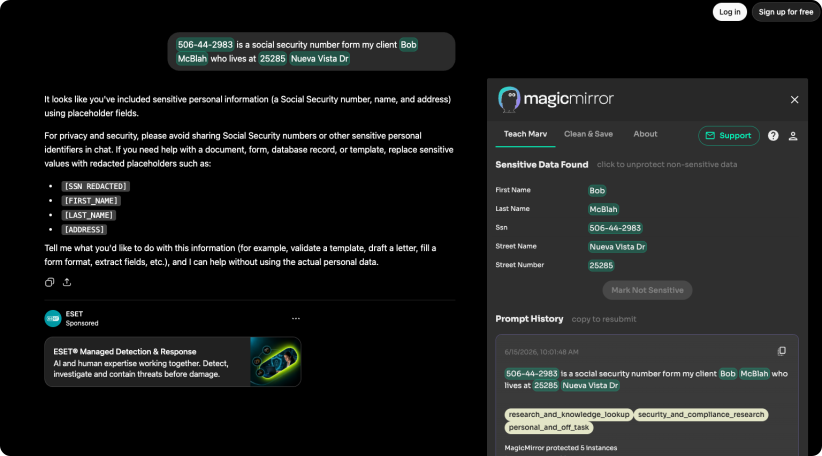
When a policy detects risk (PII in a prompt, source code in a chat), our data protection agent Marv steps in. Marv anonymizes sensitive data on-device before it leaves the endpoint. The employee sees the protections while continuing their work and the data stays safe.
05
A full audit trail of every decision
Every policy evaluation, every prompt, every allow, warn, or block. Timestamped, exportable, regulator-ready. When an auditor asks how you enforce your AI policy, the answer is in one report.
How it works
Write once. Enforce everywhere.
STEP 01
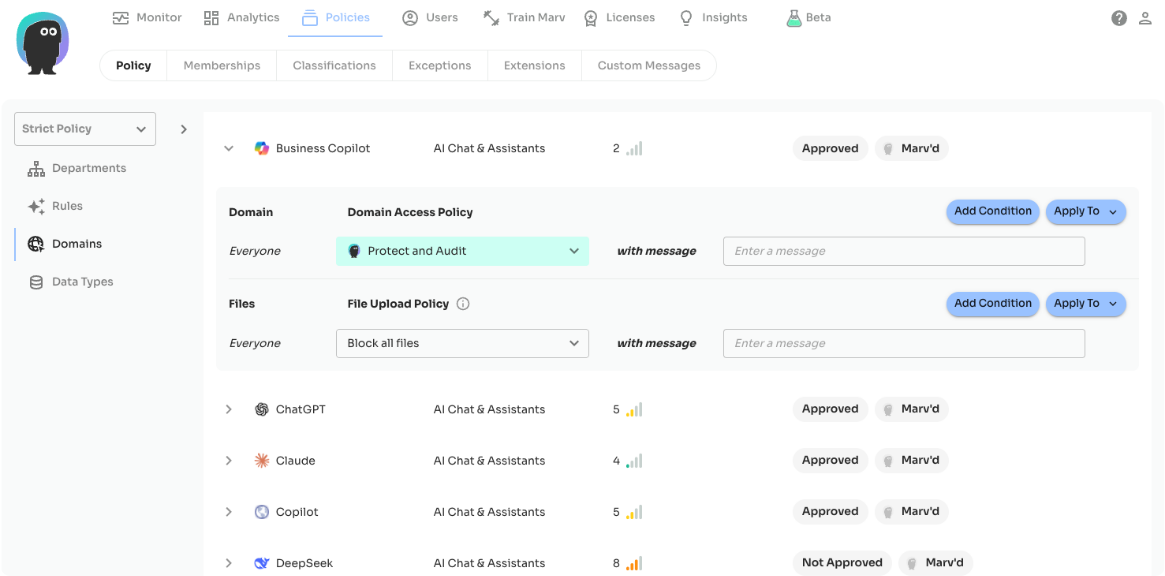
Author policies in the console, or start from a template
Start with one of our starter policies or write your own from scratch. Policies describe who can use what, with which data, under which conditions. No code. No custom rule language.
STEP 02
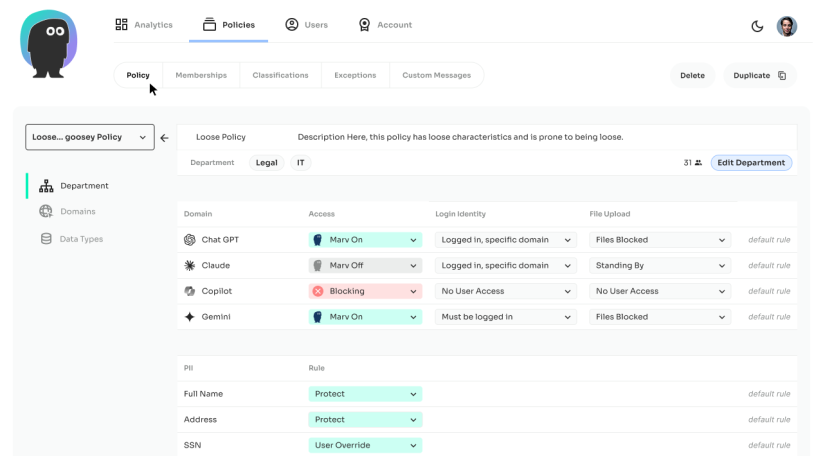
Policies deploy to every endpoint
One deploy, one management surface. No new console. No new agent.
STEP 03
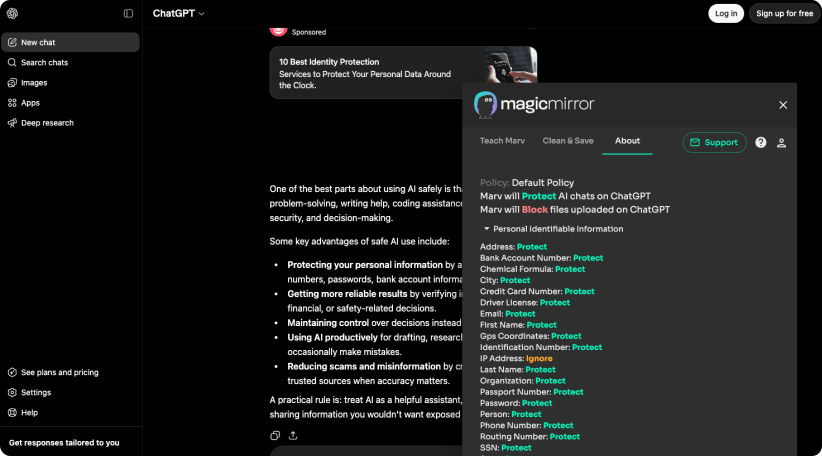
Decisions happen on-device, in milliseconds
When an employee interacts with an AI tool, policies evaluate the context in real time. Allow, guide, redirect, or block. No network round-trips. No latency. No user-visible delay when the answer is yes.
Get started
AI starter policy every CISO should deploy.
A practical guide for enforcing AI policy in regulated environments.
Writing an AI policy from a blank page is hard. Writing one that your employees will follow is harder. We’ve compiled a starter policy, which is available for use right away, or customized to meet your business needs.
Schedule a policy demo
Playbook
Block personal-account AI logins from corporate devices
Trigger PII redaction before prompts leave the endpoint
Role-based allow-lists for engineering, finance, and legal
Default audit-ready logging for every AI interaction
Integrations
Policy that fits the security stack you already have.
Policies read user identity from your IdP, enforce decisions through the same browser extension that powers Risk Monitoring, and write every event to your SIEM.
Identity
Okta, Microsoft Entra ID, Google Workspace
Endpoint Management
Jamf, Microsoft Intune, Kandji distribution

Browsers
Chrome, Microsoft Edge, Safari, Firefox
AI Systems
500+ AI tools, Chat & assistants, Embedded AI, Local agents & MCP
MagicMirror AI Security Platform
AI Policy Enforcement
A strong AI program is safe and effective: visibility to see what's happening, controls to keep it secure, and measurement to prove it's working.

See it
AI Risk Monitoring
See every AI tool, account, and prompt used across your organization – both personal and enterprise logins. Real-time dashboards and proactive risk assessment by department, role, and risk level.


Control it
AI Policy Enforcement
Set rules for how AI gets used and accessed. Allow, guide, protect, or block and redirect, all on-device, in milliseconds.

Protect it
AI Data Protection (Marv)
Last-mile protection for PII, PCI, PHI, and IP. Marv detects and anonymizes sensitive data on-device, before it leaves. Specialized models for industry verticals like financial services, healthcare and legal.

Measure it
AI Insights
Measure AI productivity, proficiency, and adoption. The Insights Agent scores anonymized prompt sessions and surfaces patterns that drive ROI.
Customer proof
From “no” to “yes, here’s how.”
Security leaders in regulated industries use MagicMirror to enable AI safely, not forbid it. IT stops being the department that says no.

Customers & Partners






70%
Access personal AI accounts outside corporate control
92%
of CISOs are concerned about AI agents in their environment
Darktrace 2026
$4.63M
average cost of a shadow-AI-related data breach
BM Cost of a Data Breach 2025
Frequently Asked
The questions CISOs ask about policy enforcement.

Will this annoy my employees?
Not if your policy is well-designed. MagicMirror's philosophy is guide, don't block. Most employee interactions trigger no at all with protection happening (allowed). A smaller number trigger a brief guide (redirect to the approved tool, remind of policy). Only the highest-risk actions are blocked outright as required by your defined policy. The goal is that policy is almost invisible to the employees doing the right thing, and supportive to the ones who would otherwise do the wrong thing.
What if we already have an AI policy?
Good. Most customers come to us with a written policy. MagicMirror helps you enforce it. Your team can translate the existing policy into MagicMirror rules, or we can help. Policies are the input, enforcement is what we add.
How granular can the policies get?
Policies evaluate user role (from your IdP), data classification (detected on-device), tool identity, tool risk tier, and time-of-use. Example: 'Engineering can use Cursor and Claude Code. Everyone else cannot. Finance cannot paste spreadsheets containing PII into any AI tool. Everyone must be logged in via our corporate account to use Claude or ChatGPT. Audit logging is on for everything.'
Do we need Risk Monitoring first?
We strongly recommend it. Writing policy without monitoring data is writing policy blind. Most customers run Risk Monitoring for 30 days first, use the output to inform policy, and then enable enforcement. That said, if you have a clear existing policy and want to turn on enforcement immediately, you can.
How does this work with AI Data Protection (Marv)?
Policy Enforcement decides what should happen. Data Protection makes it happen at the last mile. When a policy detects sensitive data in a prompt, it hands off to Marv, which anonymizes the data on-device before the prompt leaves the browser. The two products work together; most customers deploy them in sequence.
Can policies be rolled out gradually?
Yes. Policies can run in monitor-only mode first (logging every decision without enforcing it) so you can validate behavior before turning on enforcement. Policies can also be scoped to a single department or pilot group before company-wide rollout. Most customers start with one team (often IT or engineering), refine, then expand.
Close the gap between policy and reality.
Just like magic
See MagicMirror enforce your AI policy on real prompts, in real time. No commitment.
Questions? sales@magicmirrorsecurity.com



