
AI Insights
Drive AI productivity and understand adoption.
Identify areas of strength and weakness to drive ROI and allow your business to get more out of every prompt session.
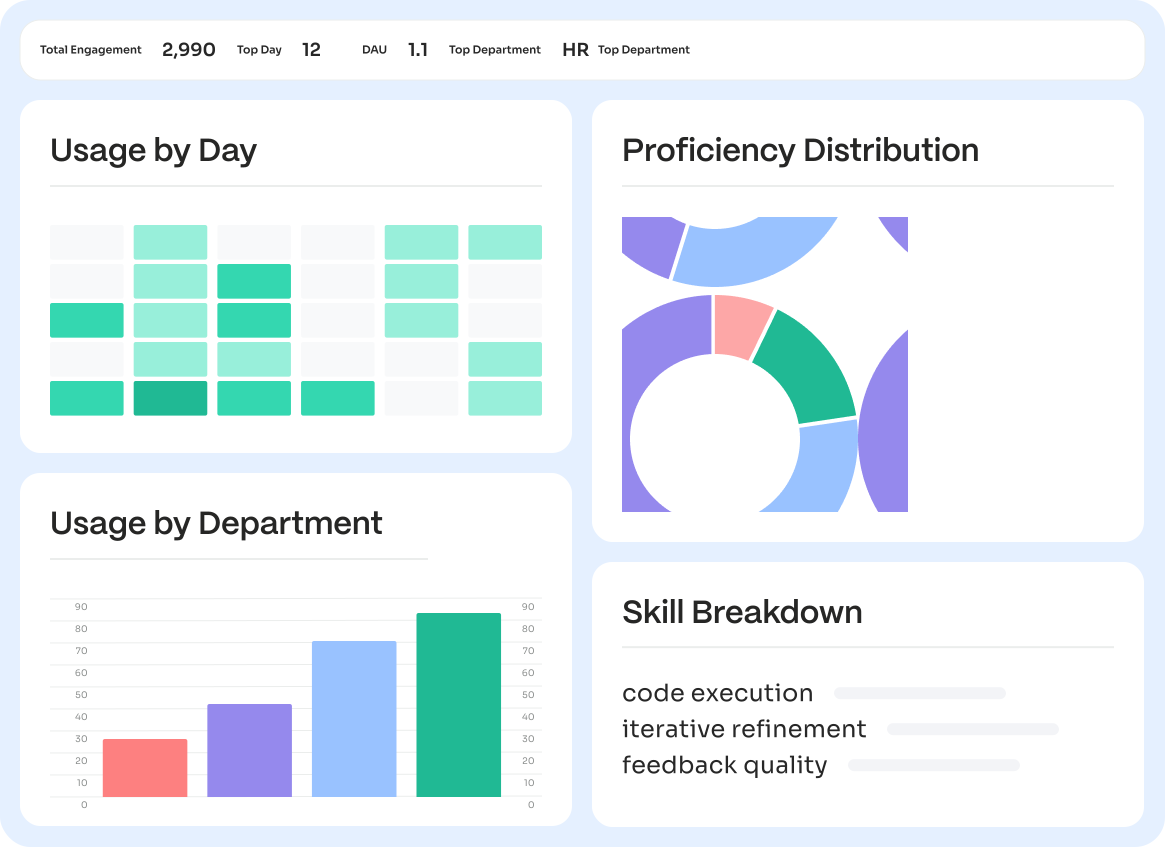
Usage Proficiency Skill breakdown All in one place
The ROI question
You deployed AI. Is it actually working?
Your company invested in AI licenses for thousands of employees, but AI dashboards only show seats purchased and logins per week, not a comprehensive view of adoption.
71%
of CIOs say AI usage doesn't match spend
Dataiku / Harris Poll 2026
67%
lack visibility into which AI tools are actually in use
IBM CEO Study 2026
60%
of GenAI projects will be abandoned by 2027 due to governance, data, and cost failures
Gartner 2026

What you get
Three views of your AI program.
MagicMirror turns AI activity into three distinct analytical outputs. Who is getting value? What should I work on next? Where are my skills gaps?
STEP 01
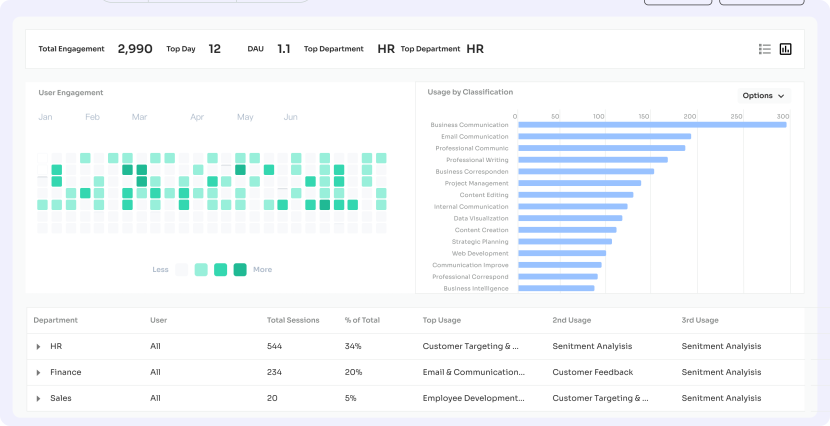
AI Usage by Department & Use Case
See how each department leverages AI: total engagement, top use cases, daily and weekly active users, all broken down by team.
STEP 02
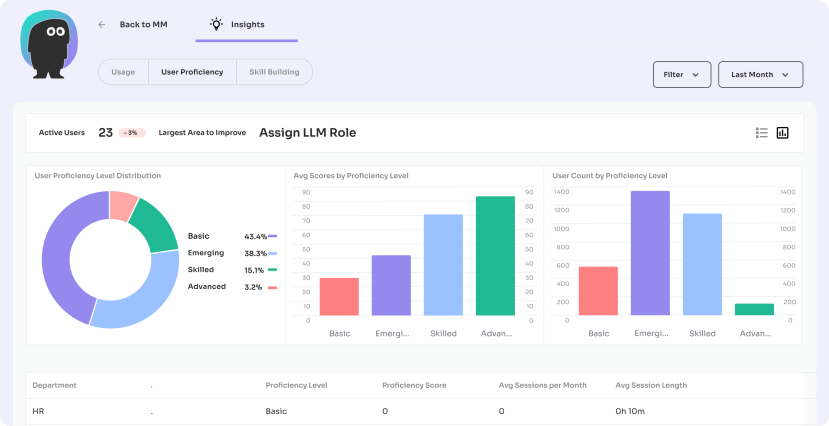
Workforce AI Proficiency Dashboard
Measure and benchmark AI proficiency across departments. Track skill levels from Basic to Advanced at session-level granularity. Know which departments are skilled and which need more AI enablement. Proficiency is the metric that connects AI investment to business outcome.
STEP 03
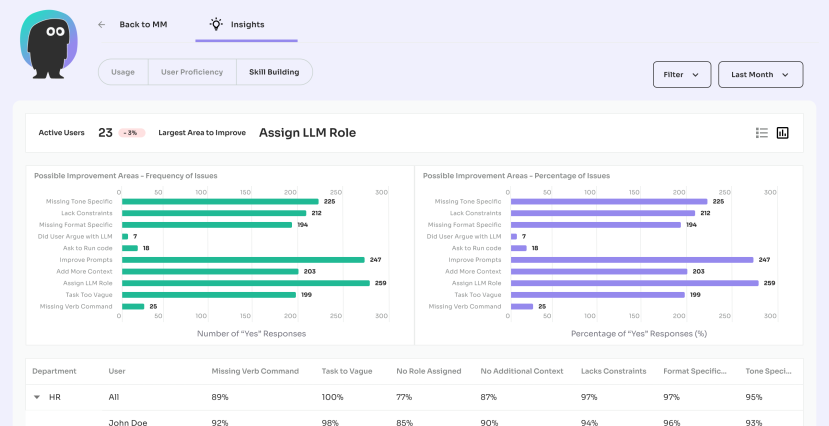
AI Skill Breakdown by Department
Identify skill gaps and training opportunities with precision. Every department is scored across top competency dimensions: Bias control, constraint definition, task decomposition, iterative refinement and tool usage.
How it works
Session-level analysis of every prompt.
01 Capture
Every session, tagged
02 Analyze
The Insights Agent scores
03 Report
Three views surface
01
Every session, tagged
MagicMirror sees every AI interaction via the same browser extension that powers Risk Monitoring. Sessions are tagged with department, role, tool, and session metadata. No separate agent to deploy.
02
The Insights Agent scores
Our proprietary Insights Agent scores each anonymized session across ten competency dimensions. Prompts are anonymized before analysis, not after. The Agent never sees sensitive content.
03
Three views surface
Three views surface the Insights Agent's findings: usage by department, proficiency distribution, and skill-dimension breakdown. Access executive summary exports for board decks and department-level reporting for team leads and planning cycles.
Privacy by Design
Prompts are anonymized before the Insights Agent analyzes them. The Agent scores the craft of each session not the content. You get proficiency insights without surveilling employees.

What gets measured
Signals of AI proficiency
Proficiency is not a single score. It is a pattern of skills that compound into effective AI use. Our Insights Agent measures a variety of signals, independently, for every prompt session.
01
Bias control
Does the prompt recognize and mitigate likely model biases?
02
Constraint definition
Are boundaries, formats, and limits explicitly specified?
03
Task decomposition
Are complex tasks broken into reasoning steps?
04
Iterative refinement
Does the user build on prior turns to converge on the answer?
05
Tool usage
Is the user choosing the right AI tool for the task?
Integrations
Connects to the systems your team already runs on.
Insights organizes around your org structure and connects to your existing identity supplier.
Identity
Okta, Microsoft Entra ID, Google Workspace
Endpoint Management
Jamf, Microsoft Intune, Kandji distribution

Browsers
Chrome, Microsoft Edge, Safari, Firefox
AI Systems
500+ AI tools, Chat & assistants, Embedded AI, Local agents & MCP
MagicMirror AI Security Platform
AI Insights
A strong AI program is safe and effective: visibility to see what's happening, controls to keep it secure, and measurement to prove it's working.

See it
AI Risk Monitoring
See every AI tool, account, and prompt used across your organization – both personal and enterprise logins. Real-time dashboards and proactive risk assessment by department, role, and risk level.


Control it
AI Policy Enforcement
Set rules for how AI gets used and accessed. Allow, guide, protect, or block and redirect, all on-device, in milliseconds.

Protect it
AI Data Protection (Marv)
Last-mile protection for PII, PCI, PHI, and IP. Marv detects and anonymizes sensitive data on-device, before it leaves. Specialized models for industry verticals like financial services, healthcare and legal.

Measure it
AI Insights
Measure AI productivity, proficiency, and adoption. The Insights Agent scores anonymized prompt sessions and surfaces patterns that drive ROI.
Customer proof
Operating with AI as a measured capability.
Operations and people leaders use Insights to move from “we have AI” to “we know how well we use AI and where to invest next.”

Customers & Partners






Frequently Asked
Questions from operations and people leaders.

Does the Insights Agent read employee prompts?
Prompts are anonymized before analysis. The Agent scores the craft of a session (was the prompt well-structured? were examples provided? was the task decomposed?) without reading what the person actually wrote about. You get proficiency insights without surveilling your employees.
How accurate is proficiency scoring?
Each session is scored across all ten dimensions. The dimensional scores roll up to a proficiency level (Basic, Emerging, Skilled, Advanced). Scoring is directional rather than absolute: it is designed to show change over time and differences between teams, not to produce a number you would use for individual performance review.
Can individuals be identified or ranked personally?
By default, Insights reports are aggregated at the department, team, and role level. Individual identification is available only to authorized administrators and only where local policy permits. We recommend treating Insights as a program-level tool, not a performance-management tool.
Does this require the other MagicMirror products?
Insights requires the browser extension that also powers Risk Monitoring. Most customers deploy Monitoring first, add Policy Enforcement and Data Protection for security coverage, and add Insights when they want to measure proficiency and ROI. The products share one deployment surface.
How is this different from our BI tool?
Your BI tool shows what you feed it. Most organizations feed it seat counts and login frequencies. Insights produces the actual proficiency and usage data that a BI tool could then visualize. You can also export Insights data into Tableau, Looker, or Power BI if that is your preferred reporting surface.
What about privacy regulations (GDPR, etc.)?
Because prompts are anonymized before the Agent analyzes them, Insights operates on technique metadata rather than personal content. For GDPR-regulated environments, the combination of anonymization, aggregate reporting, and role-level controls is designed to meet data-minimization requirements. Specific compliance posture available in our Trust Center.
See your AI program clearly.
Get started
Usage, proficiency, and skill breakdown in one place. Built for operations and people leaders.
Questions? sales@magicmirrorsecurity.com



