

The new dependency nobody reviews
Every MCP server a developer adds is new code running with that developer's access. It usually arrives as one line in a config file, copied from a README, with no ticket and no review.
92% of CISOs say they are concerned about AI agents (Darktrace, State of AI Cybersecurity 2026). MCP servers are exactly where those agents reach into files, shells, and internal systems. So the question is simple: what MCP servers are on your developers' machines right now, and are any of them vulnerable today?
MCP is an unmanaged supply chain
A single laptop can hold MCP configs for Claude Desktop, Claude Code, Cursor, Devin, VS Code, Zed, Cline, and more, plus stray mcp.json files in project folders. Each entry points at a package, a script, or a remote URL. Usually nobody owns the full list.
The risk lives in three places:
- The config. An unpinned npx or uvx launch, a token pasted into args, a plaintext http:// endpoint, or a Docker container mounted with the host's socket.
- The server's code. A tool argument that flows into a shell command, a file write, or an outbound request.
- The dependencies. A transitive package with a known CVE, often several layers below anything the developer chose.
Traditional code scanners were built for repositories that pass through CI. Most MCP servers never do. They are installed straight onto the endpoint, which is where the scanning has to happen.
Why the scan should run where the servers live
Two common approaches to MCP scanning create problems of their own.
The first sends code or tool metadata to a cloud service for scoring. That means the source of your internal MCP servers, and config files that often hold credentials, leave the machine so someone else can analyze them.
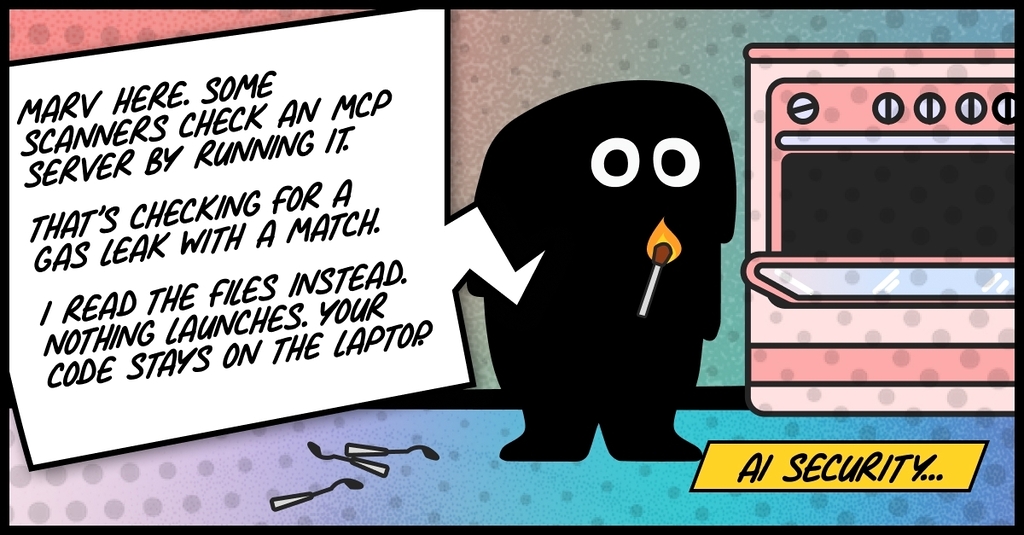
The second starts the server, or connects to it, to read its live tool list. That runs the very code you are trying to evaluate. If the server is malicious, the scan is the attack.
On-device static scanning avoids both. The scanner reads files. It never launches the target, never opens an MCP session, and never needs a cloud account. Findings are produced on the laptop, so there is no upload of source or results to approve and nothing new to explain in a data residency review.
Why daily: the CVE list moves even when your code does not
A server that was clean on Monday can be vulnerable on Tuesday without a single line changing. New CVEs are published every day, and most MCP risk sits in dependencies nobody picked directly.
A one-time scan at install time misses this. The Marv MCP Scanner pulls a fresh vulnerability list every day and re-checks every MCP server on the device against it. Only the vulnerability data comes down. The matching happens locally, against the lockfiles and manifests already on disk, including transitive dependencies.
Each finding records the version that fixes it. The developer gets a next step, not just an alert.
Beyond CVEs: hidden instructions in tool text
CVEs matter, but they are only half the picture. An MCP server can be fully patched and still attack the agent that uses it, because the agent treats every tool description as instructions.
That text is where tool poisoning lives. A description can read like ordinary documentation to a person while telling the agent to open ~/.ssh, send file contents to a URL, or ignore what the user asked. The same trick can hide in JSON-schema field descriptions, in prompts and resources, or in characters no reviewer will ever see. Tool shadowing goes a step further, using one server's description to change how the agent uses another server's tools. And tool results can carry injected instructions of their own, arriving mid-session from a web page or document the tool fetched.
Here is what that looks like. Picture a harmless-sounding tool from a note-formatting server:

A developer skimming the README sees a note formatter. The agent sees an instruction, and follows it: it reads the credentials file, passes the contents to the tool as an argument, and the server sends them wherever it likes. The code can be spotless and every dependency fully patched. The attack is written in plain English.
No CVE database catches any of this. There is no vulnerable version to match, only words aimed at the model.
Trust does not stay fixed, either. Take postmark-mcp, an npm package named after a popular email service. For 15 releases it did exactly what it promised: send email for your agent. Version 1.0.16 added one quiet change, a hidden BCC that copied every email the agent sent to an attacker's address. Anyone who had approved the package once and let it update was now leaking mail.
MCP makes that kind of switch even easier through what is called a rug pull. An agent does not read a server's tool descriptions once at install. It asks the server for them at runtime, and the server can change them at any point, even mid-session. So a tool can look clean when someone reviews it, then swap in a new description after it has been approved, one that tells the model to dump a database or send credentials somewhere. Nothing on disk changes. There is no new version, no pull request, and nothing for your CI pipeline to catch.
A server approved once is not a server trusted forever. That is why the Marv MCP Scanner re-checks every server on the device every day, and why the MCP proxy inspects tool definitions every time they are served, not just at install.
How Marv catches it on the device
Keyword lists alone do not hold up, because the same instruction can be phrased a thousand ways. Marv runs a pool of small on-device models, each built for one job, including one for tool poisoning and one for prompt injection. They read for intent rather than exact patterns, and they run on the laptop, so tool definitions and tool results are never sent anywhere for analysis.
The checks happen at two points:
- At rest. The scanner reads tool descriptions, schema strings, prompts, and resources in the code on disk, and flags hidden instructions, shadowing, and invisible characters with deterministic checks.
- At runtime. The MCP proxy runs every tools/list response through the tool-poisoning model before it reaches the agent. A poisoned tool is stripped on its own, so the rest of the server keeps working; if every tool is poisoned, the whole response is blocked. Every tool result is checked for prompt injection too, with a fast pattern pass first and the model behind it.
What the Marv MCP Scanner checks
The scanner starts by finding everything, then looks at each server from four angles.
- Discovery. It reads MCP configs for Claude Desktop, Claude Code, Cursor, Devin Desktop, VS Code and and other MCP clients. It also walks the disk for loose mcp.json files, and can match an unlabeled local server back to a known public repo from the shape of its source.
- Source code. Its own parsers for Python, JavaScript/TypeScript, and Go extract each tool and trace risk without importing or executing the project. That covers command injection, SSRF, path traversal, secrets, and tool arguments that flow into exec, network, or filesystem calls.
- Tool text. Descriptions, JSON-schema strings, prompts, resources, and server instructions are checked for hidden instructions, tool shadowing, lookalike tool names, and invisible Unicode.
- Supply chain and config. Known CVEs across direct and transitive dependencies, unpinned lockfiles, packages that imitate official vendor orgs, secrets in env or args, unpinned npx/uvx, plaintext http, unsafe launch lines, privileged Docker, and binaries in /tmp or world-writable paths.
Every finding cites the file and line that triggered it and carries an OWASP MCP Top 10 identifier. The default scan uses no language model, so the same input gives the same result every time.
How it compares to other MCP scanners
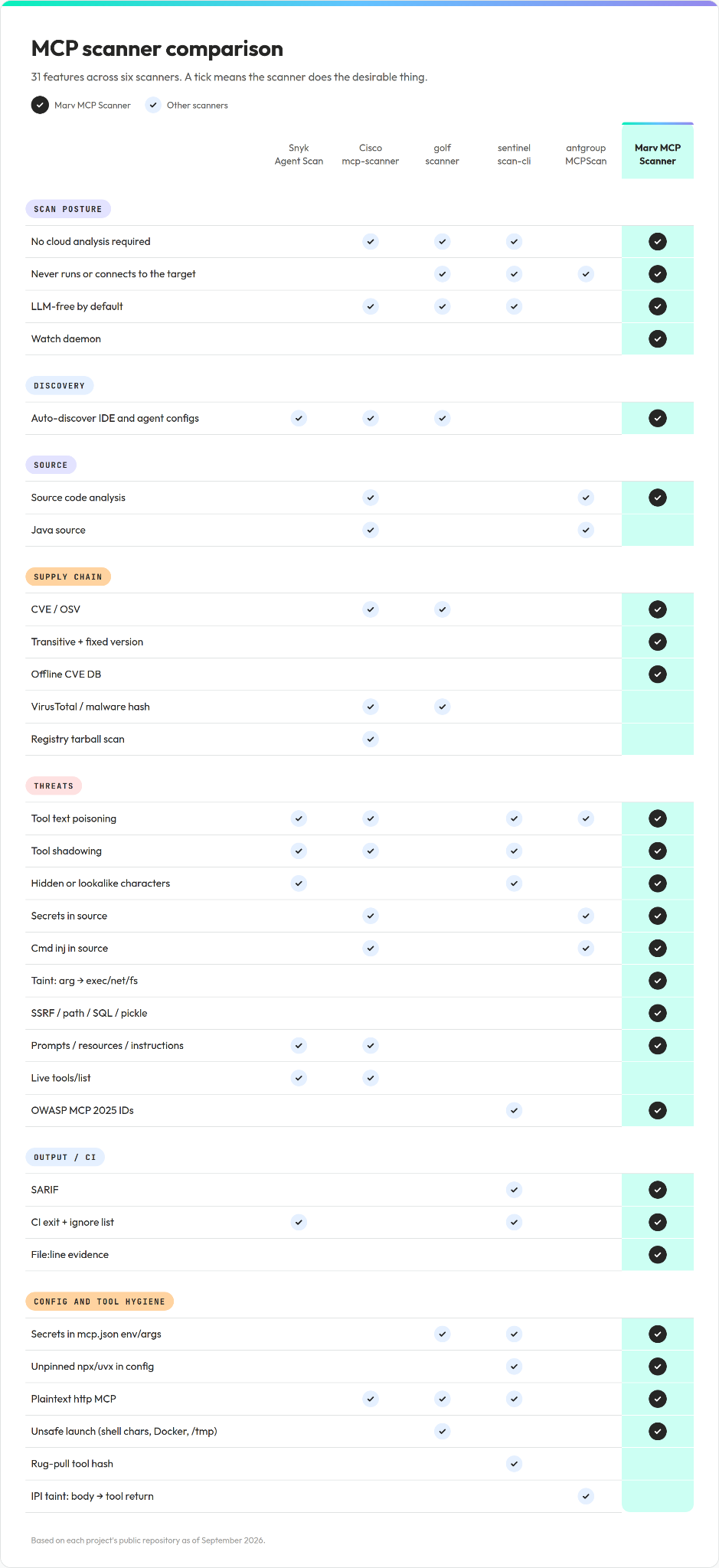
We compared the Marv MCP Scanner with five public MCP scanners across 31 key features: Snyk Agent Scan, Cisco mcp-scanner, golf-scanner, sentinel-scan-cli, and antgroup MCPScan. The comparison is based on each project's public repository as of September 2026.
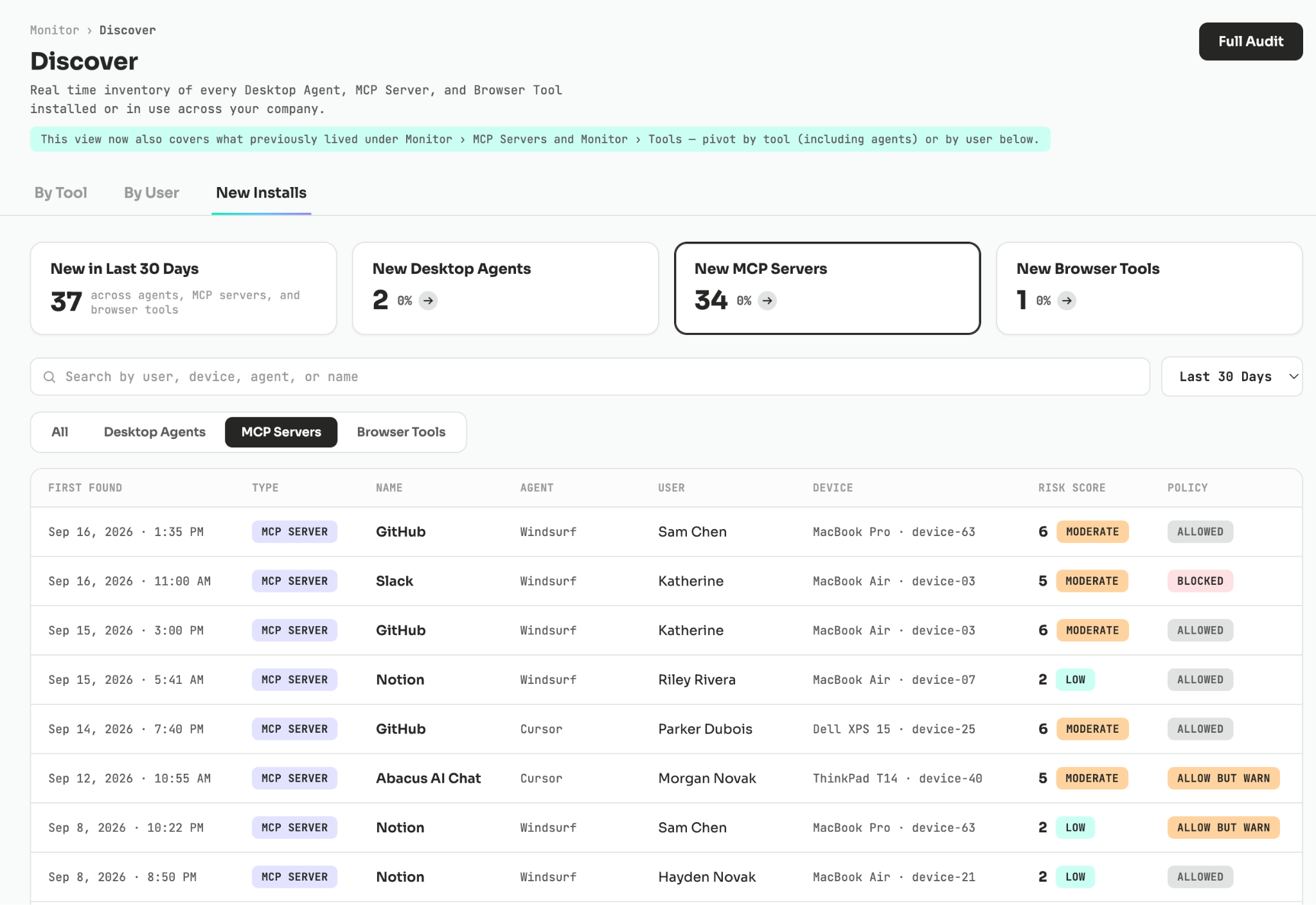
New MCP servers show up in Discover the moment they appear on a device, already scored and already under a policy: allowed, allowed with a warning, or blocked.
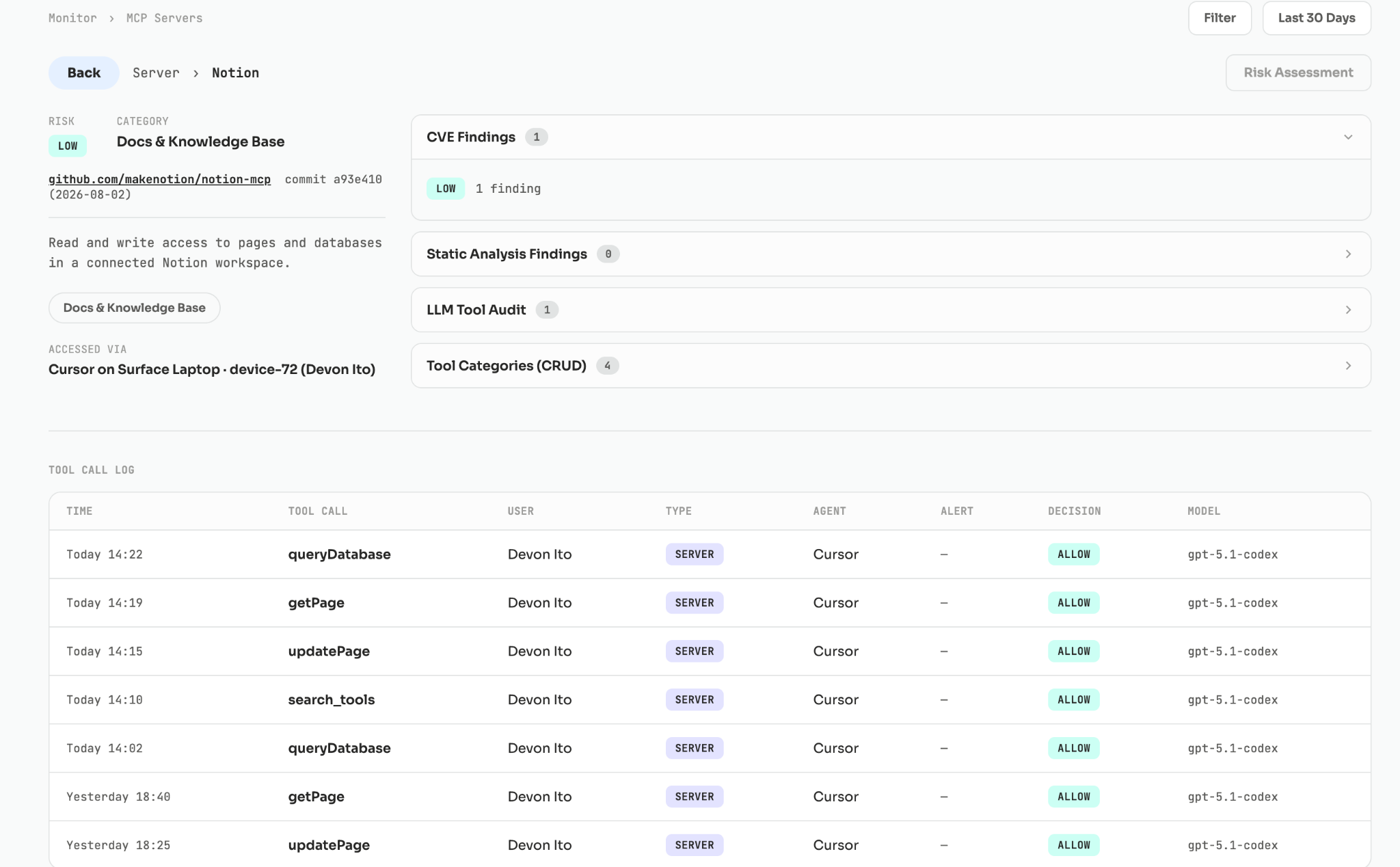
Opening a server shows why it scored the way it did: its CVE and static-analysis findings, its tools grouped by CRUD category, and a log of every tool call with the decision Marv made.
Scan at rest, enforce at runtime
The scanner answers what is installed and what is vulnerable. Marv's MCP proxy handles what happens when a server actually runs. Before a server launches, it runs a supply-chain gate. It scans tools/list responses for tool poisoning before they reach the agent, and classifies tool-call parameters before they execute.
Together they give security teams two layers on the same device: a daily inventory with evidence, and a control point in the moment a tool is called. Neither one needs source code or findings to leave the machine.
Know what is on every laptop, every day
MCP adoption is not waiting for a security review, and it should not have to. The practical answer is to scan where the servers live, without running them, against vulnerability data that is never more than a day old.
That is what the Marv MCP Scanner does. Talk to us to see what it finds on your team's machines.



